
This tutorial should work on most of the Ubuntu versions, I have tested it on Ubuntu 18.04
PostgreSQL is a powerful open-source database management system. Its basically a software that manages your database.
phpPgAdmin is a software that allows you to control PostgreSQL via a Graphical User Interface.
Steps for installation
- Installing the right softwares
sudo apt-get update
sudo apt-get install postgresql postgresql-contrib
sudo apt-get install apache2 phppgadmin2. Configuring Apache2
In order to access phpPgAdmin via your browser, the Apache web server needs to be configured. Therefore open the phppgadmin.conf file:
cd /etc/apache2/conf-available/
sudo vi phppgadmin.confComment out the line Require Local and add Allow from all .
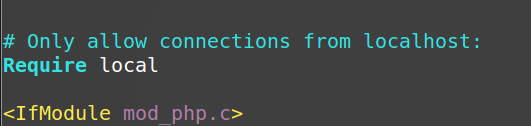
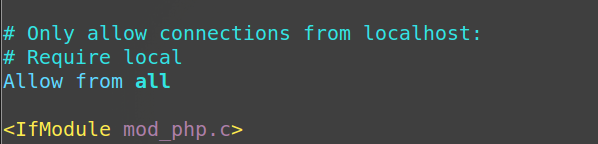
3. To allow logging into phpPgAdmin using postgres user, tweak some setting of phpPgAdmin
cd /etc/phppgadmin
sudo vi config.inc.phpSet $conf['extra_login_security'] from true to false.


4. Restart the services
sudo service apache2 restart
sudo service postgresql restart5. Open browser and go to the following url
localhost/phppgadminThe following screen should be showing up.
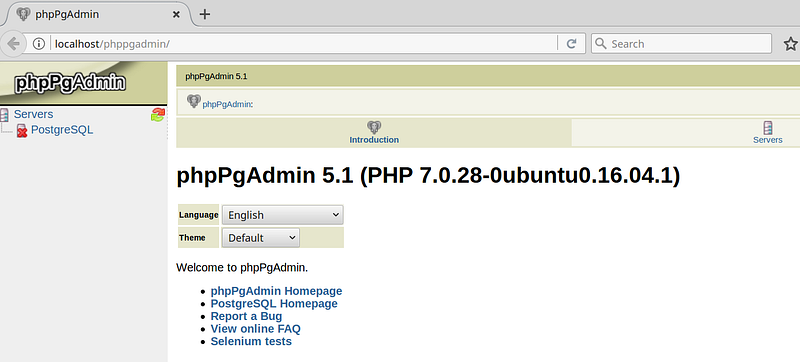
Congratulations on successful INSTALLATION of the above softwares. To actually use them, we need to configure the postgreSQL user.
Steps for Logging into postgreSQL using phpPgAdmin
Now the phpPgAdmin is asking for a login and a password. Hmm, why is that? I will try to explain in detail.
PostgreSQL uses concept of role (or simply users) to use the DBMS, i.e. to use postgreSQL you have to log in into this software, same as you need to do in an operating system.
It comes with a default user called postgres that is locked by default to prevent unintentional logging in.
To log in into postgres account, we need to set up its password. Follow the steps.
# Run psql command as postgres user created during
# installation automatically
sudo -u postgres psql
# Set the password
\password
# Quit postgres
\qNow you may login at localhost/phppgadmin