CentOS HDD S.M.A.R.T. shell script
Create path exactly this path
/var/prtg/scriptsInstall smartmontools
yum install smartmontoolsStart the service
service smartd start
chkconfig smartd onCreate shell script
touch/var/prtg/scripts/hddsmart.shAnd paste the following in the script
#!/bin/bash
serviceIsRunning=false
var1=$(smartctl -H /dev/sda |grep result |sed 's/..............................$
var2=$(echo $data)
if [ "$var1" == PASSED ]
then
serviceIsRunning=true
echo "0:200:PASSED"
fi
if [ $serviceIsRunning == false ]
then
echo "2:404:FAILED"
fiSave and Exit
Make it executable
chmod +x hddsmart.shGo to PRTG :
Add Sensor- SSH Script
Choose script – hddsmart.sh
Save
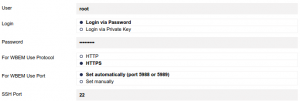
! Make sure your PRTG Server has access to your Linux server, if not, add root username and password to the credentials in the BASIC DEVICE SETTINGS