
Longhorn replicates every volume across nodes, so losing one node is a non-event. Losing all of them at once is different, and on Longhorn v1 it can cost you more than you expect. This post walks through a real scenario from a crash test: after every worker node was reset at the same moment, Kafka brokers refused to start and the database had lost transactions it had already confirmed. I’ll show what caused it, how to reproduce it in a few seconds, and the mount option that fixed it, with fio numbers for what it costs.
The Problem
Before moving real data to a new cluster (Kafka, SQL Server, Redis on Longhorn 1.13.0) I ran a set of failure tests. The last one simulated a power loss for the whole rack: every worker VM reset at the same instant.
I expected normal crash semantics: whatever the application had fsync()ed survives, anything newer may be lost. Instead two of three Kafka brokers crashed on start with:
Malformed line in checkpoint file [/var/lib/kafka/data-0/kafka-log1/replication-offset-checkpoint]:The checkpoint files had the correct size, but every byte in them was \0. The database started, but the last few seconds of committed transactions were gone.
What Caused It
Kafka was not the problem. It writes checkpoints the safe way: write to a tmp file, fsync, rename, fsync the directory. The filesystem inside the volume was not the problem either, its metadata was intact and file sizes were right. Only the data was missing, so the loss happened below the filesystem, in Longhorn.
A Longhorn v1 volume is an engine on the node where the pod runs, which forwards I/O over the network to the replicas. Each replica keeps the volume as sparse files (volume-head-*.img and snapshot files) on the node, usually on ext4 mounted at /var/lib/longhorn. Three things line up:
- The engine-to-replica data protocol has only read, write, unmap and ping. There is no flush, so an
fsync()inside the volume never reaches the replica. - The replica writes into its head file with
O_DIRECT, but withoutO_DSYNC. The data goes to the disk, but nothing makes the filesystem commit it. - The head file is sparse. The first write to a block after a snapshot lands in a hole, and ext4 has to allocate a new extent for it. That allocation is metadata, and it becomes durable only when the ext4 journal commits, every 5 seconds by default.
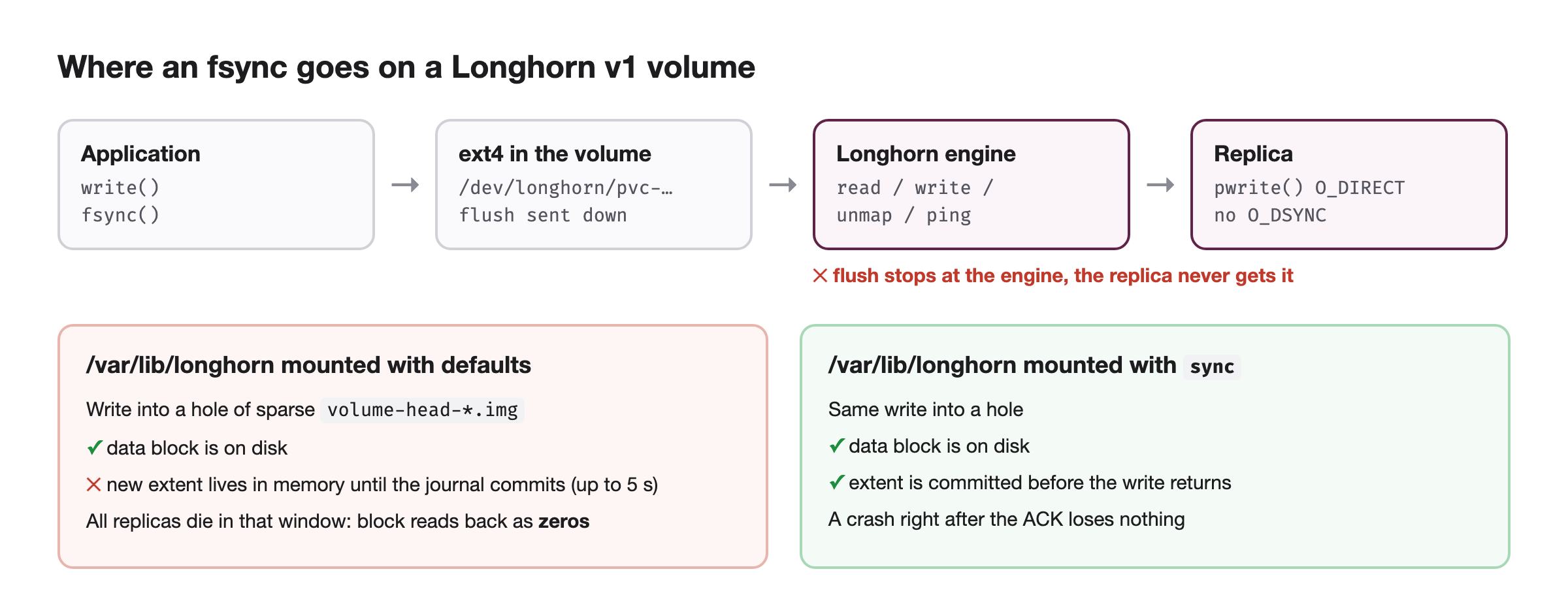
So the data block is on disk, but the extent pointing to it exists only in memory for up to 5 seconds. If the node dies in that window, after reboot the block is a hole again and reads back as zeros. With at least one surviving replica Longhorn rebuilds from it and nobody notices. When all replicas of a volume die together, the last 3-5 seconds of “durable” writes are gone.
What Didn’t Work
Trusting the Application
Kafka, SQL Server and my test writer all did the right thing with fsync. That doesn’t help when the flush stops at the Longhorn engine.
More Replicas
Replicas protect against losing some nodes. In a full power loss all replicas lose the same unflushed window, so going from 2 to 3 replicas changes nothing.
Reproducing It
Step 1: Prove the Mechanism Without Kubernetes
You don’t need a cluster for this. A loop-mounted ext4 image, a sparse file, a few O_DIRECT writes into holes, then an immediate copy of the image. That copy is what the disk would contain if the machine died right now:
set -u
D=/var/tmp/ct; mkdir -p $D /mnt/ct /mnt/ct2; cd $D
run() { # $1 = mount opts, $2 = wait before crash-copy
  umount /mnt/ct /mnt/ct2 2>/dev/null; rm -f img crash.img
  truncate -s 256M img; mkfs.ext4 -q -F img
  mount -o loop,noatime${1:+,$1} img /mnt/ct
  truncate -s 128M /mnt/ct/head.img; sync
  python3 - <<'PY'
import os, mmap
fd = os.open("/mnt/ct/head.img", os.O_RDWR | os.O_DIRECT)
buf = mmap.mmap(-1, 4096); buf.write(b"A" * 4096)
for i in range(8):
    os.pwrite(fd, buf, (1000 + i * 37) * 4096)
os.close(fd)
PY
  sleep "$2"
  cp --sparse=always img crash.img
  mount -o loop,ro crash.img /mnt/ct2 2>/dev/null || { e2fsck -fy crash.img >/dev/null; mount -o loop,ro crash.img /mnt/ct2; }
  python3 - "$1" "$2" <<'PY'
import sys
f = open("/mnt/ct2/head.img", "rb"); ok = 0
for i in range(8):
    f.seek((1000 + i * 37) * 4096); ok += f.read(4096) == b"A" * 4096
print(f"opts={sys.argv[1] or 'default'} wait={sys.argv[2]}s: {ok}/8 blocks survived")
PY
}
run "" 0; run "" 10; run "sync" 0Output:
opts=default wait=0s: 0/8 blocks survived
opts=default wait=10s: 8/8 blocks survived
opts=sync wait=0s: 8/8 blocks survivedCopied immediately, nothing survives. After 10 seconds (two journal commits) everything does. With the filesystem mounted sync, everything survives at once.
Step 2: Reproduce It on a Real Volume
To make it deterministic I used a volume with one replica pinned to the pod’s node, so one node reset means “all replicas lost”:
apiVersion: storage.k8s.io/v1
kind: StorageClass
metadata:
  name: crashtest-local
provisioner: driver.longhorn.io
reclaimPolicy: Delete
volumeBindingMode: Immediate
parameters:
  numberOfReplicas: "1"
  dataLocality: strict-local
fsType: ext4The writer pod does what Kafka and a database do, and prints ACK only after both writes are durable from the application’s point of view:
import os, time
d = "/data"
dfd = os.open(d, os.O_RDONLY)
wal = os.open(f"{d}/wal", os.O_WRONLY | os.O_CREAT | os.O_APPEND, 0o644)
seq = 0
while True:
    seq += 1
    with open(f"{d}/ckpt.tmp", "wb") as f:
        f.write((f"{seq}\n" * 400).encode()[:4000])
        f.flush()
        os.fsync(f.fileno())
    os.rename(f"{d}/ckpt.tmp", f"{d}/ckpt")
    os.fsync(dfd)
    os.write(wal, f"REC {seq:08d}\n".encode().ljust(512, b"."))
    os.fdatasync(wal)
    print(f"ACK {seq} {time.time():.3f}", flush=True)
time.sleep(0.05)Step 3: Crash the Node
Follow the log from outside the node, then reset it through sysrq. b reboots immediately, without syncing or unmounting anything:
kubectl -n crashtest logs -f writer > acks.log &
sleep 30
ssh root@worker-5 'nohup sh -c "sleep 1; echo b > /proc/sysrq-trigger" >/dev/null 2>&1 &'
sleep 6; kill %1
grep ACK acks.log | tail -1Step 4: Verify
Once the node is back, a second pod mounts the same volume, checks whether the checkpoint is all zeros and counts valid WAL records. Two runs with default mount options:
last ACK seen: ACK 815
CKPT size=1600 allzero=True
WAL records=815 good=752 bad=63 last=752

last ACK seen: ACK 555
CKPT size=1600 allzero=True
WAL records=555 good=512 bad=43 last=512The WAL has the right number of records, but the last 63 and 43 are zeros, and all of them had been acknowledged. The checkpoint is zeros both times.
The Fix
Mount the replica filesystem with sync on every storage node. In /etc/fstab:
UUID=<uuid> /var/lib/longhorn ext4 defaults,noatime,discard,sync 0 2Apply it without a reboot and check:
mount -o remount,sync /var/lib/longhorn
findmnt -no OPTIONS /var/lib/longhornShould return rw,noatime,sync,discard.
Same crash test, three runs, all of them like this:
last ACK seen: ACK 587
CKPT size=1600 allzero=False seq=587
WAL records=587 good=587 bad=0 last=587Then I repeated the full test with all worker VMs reset at once. Kafka brokers came up by themselves and SQL Server lost nothing. Redis lost about a second and Kafka a couple of messages, but that is their own appendfsync everysec and flush interval, not the storage.
To roll back: remove sync from fstab and run mount -o remount,async /var/lib/longhorn.
Why This Works
With sync, ext4 commits the extent allocation together with the write. An O_DIRECT write into a hole is durable by the time it returns, so the replica no longer depends on the journal commit interval. Overwrites of already allocated blocks were never affected, which is also why the cost depends so much on the workload.
What It Costs
fio inside a single-replica volume on three nodes with different disks, before and after:
| Test | NVMe | Thin SSD | ZFS zvol |
|---|---|---|---|
| 4k write + fdatasync, QD1 | 533 IOPS, -14% | 475 IOPS, -19% | 472 IOPS, -39% |
| 4k random write, QD32, new blocks | 6740 IOPS, -64% | 4469 IOPS, -72% | 4766 IOPS, -81% |
| 4k random overwrite, QD32 | ~17k IOPS, no change | ~17k IOPS, no change | 13.8k to 8.2k, -41% |
| 1M sequential write, QD8 | 234 MB/s, no change | not measured | 231 to 168 MB/s |
Rebuilding a 4 GiB replica on NVMe took 51 s before and 46 s after, so rebuilds are not slower.
A volume waits for its slowest replica. If one replica sits on the ZFS node, the ZFS column is your number. And the “new blocks” row is not a one-off: every snapshot starts an empty head file, and every scheduled backup takes a snapshot.
Prevention
- Check the mount options on every storage node:
findmnt -no OPTIONS /var/lib/longhorn. - Decide on
syncbefore production data goes in. On one cluster I kept it. On another the owner decided a full power loss is rare enough and speed matters more, so it was rolled back. Both are fine as long as it’s a decision. - If you run without
syncand Kafka hits zero-filled checkpoints, move the zeroed*-checkpointfiles out of the log directory and restart the broker. Kafka rebuilds them. - My tests reset VMs while the hypervisor stayed up. In a real power cut durability also depends on the VM disk cache mode (not
unsafe), ZFSsync(notdisabled) and the drive’s power-loss protection. A UPS is still needed.
Takeaways
- Longhorn v1 replication protects against losing some replicas, not all of them at once.
- An
fsync()inside the volume does not reach the replica’s disk. New blocks stay non-durable for up to the ext4 commit interval. - The symptom is easy to recognize: correct file sizes, content full of zeros.
syncon/var/lib/longhornfixes it. The cost is small for overwrites and sequential writes, and large for random writes into new space.- The loop-image test from Step 1 checks the mechanism in seconds on any Linux machine.